


Project Overview
Studenty is a mobile marketplace app designed for students to buy and sell used books and student essentials within their campus community. The app enables students to connect, list items, and coordinate exchanges in familiar campus locations, creating a safer and more convenient experience compared to general marketplaces. The app was developed and launched on the App Store in 2026. View on the App Store
My Role
Project Duration
UX design generalist & founder
6 months – research, design, development & launch
Responsibilities
-
Conducted user research to identify student needs, marketplace behaviors, and key pain points.
-
Defined product requirements, business rules, marketplace policies, and MVP strategy.
-
Created personas, user journeys, information architecture, and end-to-end user flows.
-
Designed wireframes, prototypes, and high-fidelity mobile interfaces.
-
Developed verification workflows, listing policies, Terms & Conditions, and Privacy Policy requirements to support trust and platform governance.
-
Collaborated with developer throughout planning and implementation to align user experience, product functionality, and technical requirements.
Background & Story
This idea originated from a personal experience.
After purchasing an expensive textbook for a class, I later dropped the course and attempted to return the book. However, due to the store’s return policy, I was unable to return it, even though the book was completely unused.When I tried to sell it back to the bookstore, I was offered a very low price. At the same time, I noticed that the same bookstore resold used books at significantly higher prices.
This created a clear imbalance:
• Sellers (students) receive very little value
• Buyers still pay high prices
To explore an alternative, I created a small Telegram group to help students buy and sell books directly. Within just two weeks, the group grew to over 700 members and became actively used for peer-to-peer exchanges.
Even after seven years, the group remains active with hundreds of members. This validated a strong need for a student-to-student marketplace, which led to the idea of designing a dedicated mobile app.
The Problem
-
Unfair pricing from bookstores, where students receive very low buyback offers for books that are later resold at significantly higher prices
-
Lack of trust when meeting strangers through marketplace platforms
-
Uncertainty about safe and convenient meeting locations
-
Difficulty coordinating in-person exchanges
The Goal
Design a mobile app that enables students to:
-
Buy and sell used books and Student Essentials at fair prices
-
Connect directly with other students
-
Coordinate exchanges in familiar and safe campus locations
-
Reduce reliance on third-party resellers
User Research
To better understand students’ experiences with buying and selling used textbooks and course-related materials, I conducted qualitative user research. The research revealed several challenges throughout the process, including unfair bookstore buyback pricing, difficulty finding buyers, concerns about trust and safety, and the effort required to coordinate in-person exchanges. These insights helped identify the most important user needs and informed the product’s design direction and feature prioritization. Additionally, this project was informed by my own firsthand experience and observations from running a student book exchange group.
Pain Points
Lack of trust and safe, familiar contexts for in-person exchanges
Students often need to meet unfamiliar buyers or sellers when using general marketplace platforms. Without a structured and familiar environment, these interactions can feel uncomfortable or unsafe.
Low resale value through bookstores
Students receive very low buyback prices from bookstores, even for unused or like-new books.
Difficulty finding relevant buyers for specific textbooks
Students struggle to find buyers who need the exact same books, especially when course materials vary by instructor and campus.
Time-consuming coordination for arranging in-person exchanges
Coordinating meetups can be challenging when buyers and sellers are in different or unfamiliar locations. Finding a meeting point that is convenient, safe, and accessible for both parties often requires extra time and effort.
Understanding the User
User Persona

Designing a Student Marketplace
for Used Books and Student Essentials

Daniel Weber
26
Business Administration
Los Angeles, California
Single
College Student (part-time)
Age:
Education:
Hometown:
Family:
Occupation:
Goals
• Sell used textbooks and academic supplies at a fair price
• Find affordable second-hand books and course-related materials for upcoming classes
• Quickly connect with students who need the same materials
• Arrange simple and convenient meetups
• Bookstores offer very low buyback prices
• Difficult to find buyers for specific textbooks and academic supplies
• Uncertainty about where to safely meet when using general marketplace apps
• Time-consuming coordination for in-person exchange s
Frustrations
“
I just want to sell my books for a fair price and meet somewhere that feels safe and easy.
”
Daniel is a 26 years old part-time college student balancing his studies with a retail job. He is budget-conscious and often looks for ways to save money on textbooks and academic supplies. After completing courses, he prefers to resell items to recover some of his expenses.

User Story
As a college student, I want to buy and sell used books and course-related materials within my campus so that I can save money while having a safe and convenient experience.
User Journey


Problem Statement
Daniel is a college student who needs a simple and reliable way to buy and sell used books and student essentials within his campus community, because existing options such as bookstores and general marketplace apps often offer unfair pricing, make it difficult to find relevant buyers, and require meeting unfamiliar people in unstructured environments, which can feel inconvenient and unsafe.
Design Direction
Hypothesis Statement
If Daniel uses a simple, student-focused marketplace within his campus community, then he can easily find relevant buyers and sellers, arrange safe and convenient meetups, and complete transactions more efficiently, saving money, reducing uncertainty, and improving his overall experience.
Goal Statement
Our platform will let students buy and sell used books and student essentials within their campus community through a simple and intuitive mobile experience, supported by easy search, clear item details, and flexible meetup coordination, which will help students save money and feel more confident when transacting with others; we will measure effectiveness by tracking successful meetups, user engagement, and repeat usage.
Competitive Audit


Define the Experience
User Flow
Buyer

Seller
Site Map


Design Execution
Paper Wireframes
Through multiple iterations of the home page wireframes, I selected the best design elements from each version and combined them into a refined design.

Stars were used to mark the elements of each sketch that would be use in the initial digital wireframes.
Homepage


Digital Wireframes
Throughout the wireframing phase, I aligned design decisions with insights from user research.
College Selector with campus-specific listings
Allows users to select or switch their college, ensuring they can easily browse listings relevant to their campus community and connect with nearby buyers and sellers.
Campus Visibility Selection
Allows users to choose which campus can view their listing, making it easier to reach relevant buyers and connect with nearby students.

Structured Listing Form
Provides clear fields for photos, descriptions, item condition, and category, helping users create detailed listings and build trust between buyers and sellers.
Navigation Bar with essential options and label underneath
Provides easy-to-use navigation, ensuring users can quickly identify and access the most important sections of the app while improving accessibility.

Homepage
Low-Fidelity Prototype
This low-fidelity prototype demonstrates the main user flows of the app. Students can browse campus-specific listings from the home screen, view item details, contact sellers, and save items for later. Sellers can create listings through the Sell an Item page, while users can manage their account and communicate with others through the Profile and Inbox sections. These flows were designed to provide a simple, trustworthy, and convenient experience for buying and selling within the campus community.
Sell

Item
Home
Profile
Inbox


Usability Study
I conducted an unmoderated remote usability study with five college students, testing both buyer and seller flows. Sessions followed a scenario-based, think-aloud approach in which participants described how they would complete tasks using the Figma prototype (no actual transactions, data entry, messaging, or personal information were required). The study began with low-fidelity wireframes, followed by high-fidelity prototypes after several iterations. Each session lasted approximately 30–35 minutes, including an introduction, task completion, and a closing discussion.
Study Goals
The study aimed to evaluate how easily and intuitively students could navigate the app, focusing on:
• Understanding the campus selection process and discovering relevant listings.
• Evaluating the clarity of the listing creation flow and the overall posting experience.
• Assessing how easily users could browse listings, save items, and understand the messaging and meetup process.
• Identifying usability issues and opportunities for improving navigation, flexibility, and the overall user experience.
Affinity Diagram
Insights from usability testing were grouped into themes using an affinity diagram to identify recurring usability issues and opportunities for improvement.

Low-Fidelity Findings
Limited Campus Visibility
Participants felt that restricting listings to a single campus limited their ability to discover relevant items. Several students mentioned that they attend classes at multiple campuses and wanted more flexibility when browsing and posting listings.
Listing Visibility and Flexibility
Participants felt that restricting listings to a single campus limited their ability to reach potential buyers. Several students mentioned that they attend classes at multiple campuses and wanted their items to be visible across all campuses they are part of.
High-Fidelity Findings
These findings come after iteration on the low-fidelity prototype and testing a high-fidelity prototype.
Limited Campus Availability
Because Studenty is launching as an MVP, the initial version includes a limited number of campuses. During usability testing, some participants noticed that their campus was not available in the list, which made it difficult for them to continue the onboarding flow.

Design Iterations
Low-Fidelity Iterations
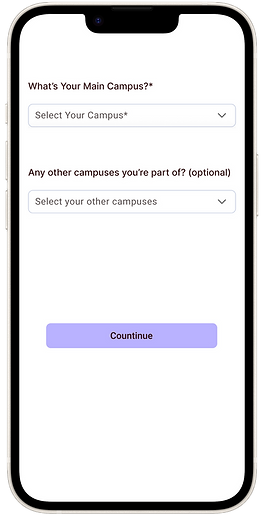
• Based on participant feedback, I introduced a multi-campus selection feature during onboarding, allowing users to choose a primary campus and additional campuses. The home feed was updated to display listings from all selected campuses, and users can modify their campus selections at any time to personalize their browsing experience.


Before Usability study
After Usability study
• Based on participant feedback, I updated the listing creation flow to support multiple campus selections. Users can now choose a primary campus and additional campuses when posting an item, allowing their listings to be visible across all campus communities they are part of and increasing flexibility for students who attend classes at multiple locations.

Before Usability study


After Usability study
High-Fidelity Iterations
To maintain a focused MVP and avoid creating inactive campus communities, the initial version of Studenty launched with a limited number of campuses. However, usability testing revealed that some participants could not find their school in the available list and were unsure how to continue.
• Based on participant feedback, I added a Request a Campus option to the onboarding flow. If users do not see their campus, they can submit a request, allowing the platform to expand gradually while providing users with a clear path to join the community even if their campus is not yet available.
Before Usability study


After Usability study
Usability Testing Outcomes
• After iterating on the design, all five participants were able to complete the tested onboarding flow and navigate the experience successfully.
• Additional feedback led to the introduction of a Request a Campus feature, providing users whose schools are not yet available with a clear next step instead of reaching a dead end.
• Multi-campus support reduced friction for students attending multiple campuses

Design System
Color Palette
The color palette follows the 60-30-10 rule, balancing clarity, trust, and approachability. Neutral backgrounds and soft blue tones create a clean and distraction-free experience, while lavender accents provide a friendly and inviting feel. Deeper purple tones are used selectively to emphasize key interface elements. Together, these colors create an intuitive and welcoming marketplace experience for students.
Hex #FFFFFF
Hex #B9B2FF
Hex #D6E4FF
Hex #4527A0
Hex #DCE3F2
Typography

Buttons
Primary
Secondary

16 PX
14 PX
14 PX
16 PX
Final Design

high-fidelity mockups
Onboarding Flow


Buying Flow
Selling Flow


Interactions – From Prototype to Live Product
As Studenty moved from prototype to development, some design elements were refined through implementation and iteration. The interactions below show the final experience in the live product.

Buying Flow – Live Experience
Selling Flow – Live Experience

Accessibility Considerations
Color Contrast (WCAG Perceivable)
I ensured sufficient color contrast between text, icons, and background elements so content remains readable for users with low vision or color vision deficiencies.
Large Tap Targets & Simple Interactions (WCAG Operable)
I used large tap targets and simple interactions to make it easier for users to tap buttons and complete actions quickly on mobile devices.
Clear Visual Hierarchy & Readable Typography
I used clear visual hierarchy and readable typography to help users quickly scan content and understand important information and key actions.
Takeaways
Impact
The final design provides students with a simpler and more trustworthy way to buy and sell textbooks and student essentials within their campus community. Through multiple design iterations and usability testing, the experience became more intuitive, reducing friction in listing items, selecting campuses, and navigating the marketplace. Participants described the flow as clear and easy to follow, with one tester commenting, “Everything felt straightforward, and I always knew what to do next.”
This project taught me that designing a great user experience goes far beyond creating polished screens. Working closely with a developer helped me understand technical constraints, prioritize features for an MVP, and make design decisions that balanced user needs with implementation feasibility. I also learned the importance of validating assumptions through usability testing instead of relying on my own expectations. Small changes, such as supporting multiple campuses and allowing users to request new campuses, had a meaningful impact on the overall experience.
What I learned
Next Steps
Future Enhancements
Usage analytics
Monitor user behavior after launch to understand where users drop off, which features they use most, and guide future design decisions.
Validate After Launch
After launch, I plan to gather feedback from a larger group of students to validate the onboarding flow, identify usability issues, and prioritize future improvements based on real user behavior.
Social Sharing Features
I plan to implement social sharing so users can share listings with friends and family, increasing engagement and potential sales.
© 2026. All rights reserved to Atousa Ghafoori